Overview
This developer guide documents the Data Harvester’s architecture, repository structure, configuration, API surface, and deployment model.
The Data Harvester is the AI-DAPT platform’s ingestion entry point, responsible for collecting data from files/APIs/databases, persisting raw objects to object storage, and maintaining operational metadata for downstream AI-DAPT processing workflows.
Architecture Overview
The Data Harvester consists of:
-
Backend (FastAPI / Python)
-
REST API for ingestion, jobs, schedules, metadata
-
Integrations:
-
PostgreSQL (jobs, metadata, schedules)
-
Object storage (MinIO/S3)
-
Optional Keycloak validation
-
Redis caching (service tokens / key material)
-
Optional Data Documentation Engine integration (DCAT/RDF publishing)
-
-
-
Frontend (Vue 3 + TypeScript + Tailwind)
-
Upload local files
-
Ingest from API
-
Ingest from DB
-
Manage files and schedules
-
View jobs
-
Keycloak login mode (when enabled)
-
-
Infrastructure
-
PostgreSQL
-
MinIO
-
Redis
-
Optional Keycloak
-
Optional DDE (piveau hub-repo)
-
Typical Flow
-
User opens the frontend (and logs in via Keycloak, if enabled).
-
User selects ingestion method (file/API/DB).
-
Backend creates a job, stores raw data in MinIO, stores operational metadata in PostgreSQL.
-
If DDE is enabled, backend generates DCAT/RDF (Turtle) and publishes it to DDE.
-
User monitors job status and schedules via the UI.
Repository structure (runtime code)
The main repository (application code) is structured as:
.
├── app/                                  # Backend FastAPI app
│   ├── auth/                             # Keycloak + auth deps + Redis cache store
│   ├── core/
│   │   ├── auth_config.py                # Auth-related config/helpers
│   │   ├── config.py                     # Settings + DB connection helpers
│   │   └── cors.py                       # CORS configuration
│   ├── routers/
│   │   ├── data.py                       # Files, download, delete, metadata, jobs
│   │   ├── ingest.py                     # File / API / DB ingest endpoints
│   │   ├── kafka.py                      # Kafka topics, send, listeners, events (under development)
│   │   ├── schedule.py                   # Schedules endpoints
│   │   └── debug_service.py              # Token exchange debug endpoint, only for dev
│   ├── services/
│   │   ├── data_documentation_engine.py  # DDE client (hub-repo)
│   │   ├── dcat_builder.py               # DCAT/RDF Turtle generator
│   │   ├── ingest_common.py              # Upload + metadata + DDE publish flow
│   │   ├── jobs.py
│   │   ├── influx_service.py             # Under development
│   │   ├── minio_service.py
│   │   ├── scheduler.py
│   │   └── storage.py                    # Postgres + MinIO helpers
│   ├── utils/
│   ├── tests/
│   │   └── test_main.py
│   ├── schemas.py                         # FastAPI entrypoint
│   └── main.py
├── frontend/                              # Vue Single-Page Application (SPA)
│   ├── src/                               # Components & pages
│   ├── public/                            # Static assets
│   ├── .env
│   └── Dockerfile
├── postgres/
│   └── init_testdb.sql                    # initialization SQL
└── docker-compose.yml
Local development (recommended path)
-
Run the full stack via Docker Compose.
-
Use the UI at http://localhost:3000
-
Use FastAPI docs at http://localhost:5002/data/docs#/
See Deployment and Configuration for details.
Testing
Tests live under app/tests/.
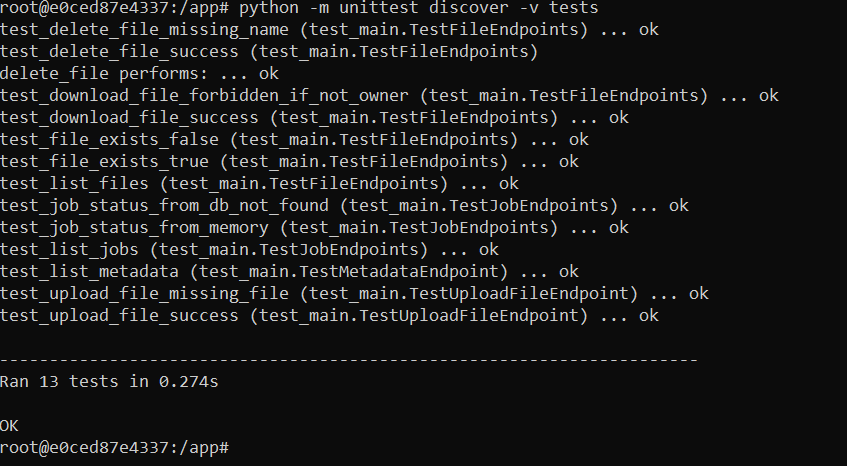
To run tests inside the container:
docker-compose exec dataharvester-app bash
python -m unittest discover -v tests
Expected output includes successful unit test execution:
Troubleshooting (first run)
On the first docker-compose up, PostgreSQL may still be starting when the backend initializes schedules.
If you see:
psycopg2.OperationalError: ... FATAL: the database system is starting upThis is typically transient. Docker restarts the backend and it succeeds once PostgreSQL is ready.
If it does not recover, restart the backend:
docker-compose logs postgres-db
docker-compose restart dataharvester-app